For Shopify stores with repeat buyers
Every customer who forgets to reorder is revenue you don't get back.
Reorder Reminder Pro is a Shopify reorder reminder app: each customer gets a replenishment reminder after the usage days you set, with one click to checkout.
How the Shopify reorder reminder app works
Three steps. No ongoing work. No batch campaigns.
Set usage days per product
Enter how many days one unit of each product lasts a typical customer. You decide the number. If every product has the same cycle, Auto Mode lets you set one value for all of them.
Reminders schedule automatically
When a customer buys, their reminder is scheduled for their purchase date plus the usage days you set. No manual work, no batch emails.
Customers reorder. You get paid.
Each customer receives a personalized repurchase reminder on their own date.
- Reorder button goes straight to checkout — no product page
- Conversions tracked — see exactly how much each reminder earns
First reminders send once the usage days you set have passed after each customer's purchase.
See pricing → Not sure if Reorder Reminder Pro is right for your store? Analyze your catalog free →Replenishment reminders for Shopify stores that sell consumables
Protein, collagen, vitamins — products with a predictable 30–90 day usage cycle.
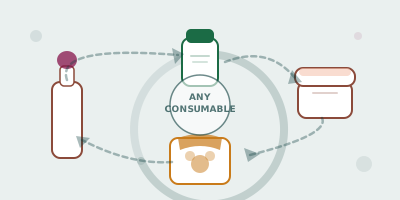
If customers buy the same product again on a regular cycle, Reorder Reminder Pro can send the repurchase reminder.
Not the right fit for custom, one-off, or non-replenishable products.
Merchant stories
"Reorder Reminder Pro has become a consistent part of our repeat revenue. We configured it once — it's been running ever since."
— Cured Pharmacy, UK · Health & wellness supplements
Read the full case study → GAPS Water Treatment
 "We sell on subscription and one-time. Reorder Reminder Pro catches the one-time buyers who forget to come back — it's been running quietly and consistently every month."
GAPS Water Treatment · UK X Supplements
 "Our customers don't always remember to reorder their protein before they run out. This app handles the reminder so we don't have to — set it once, it runs itself."
X Supplements · Australia Natures Purest
 "Exactly what we needed — reminders timed to each product's usage period, not a generic weekly campaign. Simple to configure, works reliably."
Natures Purest · New ZealandReorder Reminder Pro vs the alternatives
Reorder Reminder Pro does one job: repurchase reminders timed from each customer's purchase date and the usage days you set per product. Here is how that compares with building the same thing in Klaviyo.
| Feature | Reorder Reminder Pro | Klaviyo flows |
|---|---|---|
| Built only for reorder reminders | Yes | No — full email and SMS platform |
| How reminder timing is set | Usage days per product, in one list | A flow you build with triggers, filters and delays |
| Reorder link | Straight to checkout, product in cart | Any link you add to the template |
| Free plan | 30 reminder emails/month | 500 emails/month, 250 profiles |
Reorder Reminder Pro sends the emails itself, so you do not need a Klaviyo, Mailchimp or other email marketing account. It can also run alongside one.
Starts free. Scales with your store.
Forever Free plan included. Paid plans from $12/month.
Common questions
Is a reorder reminder the same as a replenishment email?
Yes. Reorder reminders, replenishment emails and repurchase reminders all describe the same thing: an email asking a customer to buy a consumable product again when their supply is likely to be getting low. Reorder Reminder Pro sends one per customer, timed from that customer's purchase date plus the usage days you set for the product.
Does Reorder Reminder Pro work with any Shopify store?
Yes. Reorder Reminder Pro works with any Shopify plan — no Shopify Plus required. It connects directly to your store's order data.
Do I have to set usage days for every product?
Setting usage days per product is the standard setup, because a 30-day supplement and a 90-day refill need different reminder dates. If every product in your catalog has the same usage cycle, Auto Mode is an optional shortcut that applies one usage-days value to all of them.
Does it work alongside subscription apps?
Yes. Orders tagged "Subscription", for example by Loop Subscriptions, are excluded and get no reminders. Subscribers are left alone, and one-time buyers still get their reorder reminder.
Where does the reorder button in the email take the customer?
Straight to Shopify checkout with the product already in the cart. The customer does not land on a product page first.
How is this different from building a replenishment flow in Klaviyo?
In Klaviyo you build the replenishment flow yourself: a trigger, product filters, a time delay and an email template, repeated for each product cycle. In Reorder Reminder Pro you enter usage days per product and the app schedules each customer's reminder from their purchase date.
What happens between install and the first reminder?
The app starts scheduling reminders for new orders straight away. The first emails send once the usage days you set have passed after a customer's purchase.
Is there a free plan?
Yes. The Forever Free plan includes 30 reminder emails per month and never expires. Paid plans start at $12/month for up to 500 emails.
Stop leaving repeat revenue on the table.
Set usage days for your products once. Every new order gets its reminder scheduled from there.
Free plan available · No credit card required · Installs in one click